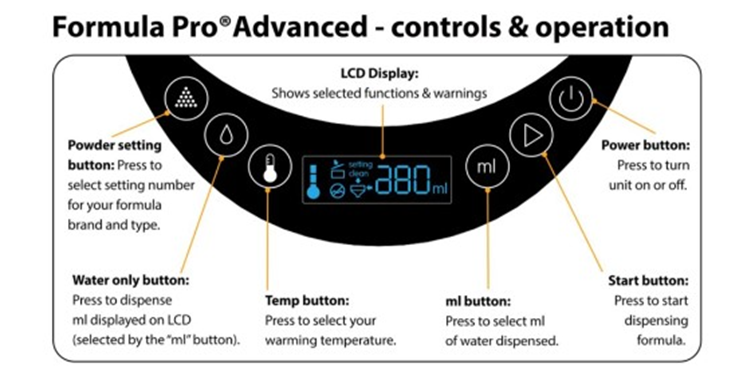
The following tips will walk you through some key functions of your machine, perfect for first time setup. These features are designed to help you customise the machine to suit your baby’s individual needs and ensure it continues to run smoothly.
How to change between ML/OZ
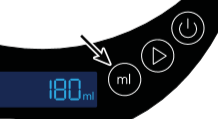
You can change between ML and OZ to adapt for which ever measurements suits you. Hold down the ML button for 5-10 seconds until you see the unit change on screen.
How to change the water temperature
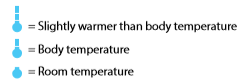
When first turned on, the machine is set to prepare milk at body temperature by default. This can be changed with the use of the temperature button according to your baby’s preference. There are three different temperature settings to choose from, see below;
- If you want to the water warmer than body temperature (approx. 40°c), press the temperature button once
- To make the water room temperature press the temperature button once more, taking it the lowest temperature
- Press the temperature button again to set it back to body temperature
The temperature indicator will flash when heating and will stay solid when the selected temperature is reached. Before dispensing a bottle you must wait for the temperature icon to stop flashing, indicating the water has reached the selected temperature.
If you turn the machine off after use, it will begin to cool, so may take longer to heat up next use. For the machine to maintain the temperature you need to keep it turned on at all times.
How to run a water only cycle
Running a water only cycle is a good way to get all water out from your machine and should also be done when carrying out the monthly clean as well. See the below tips for running this cycle on your machine
- Ensure that you have enough water in the tank if you’re running a water only cycle for measuring purposes and make sure the machine is switched on.
- Set the machine to the ml/oz amount of your choice and ensure you have a bottle or cup on the drip tray to catch the water
- Press the water droplet button on the Formula Pro Advanced screen as seen in the image below
- The machine will then dispense water into your bottle or cup to the amount that you selected previously